Bound
- 4.1
- Rating
- 100.00K
- Installs
- Free
- Price

 Analysis by App-foxy
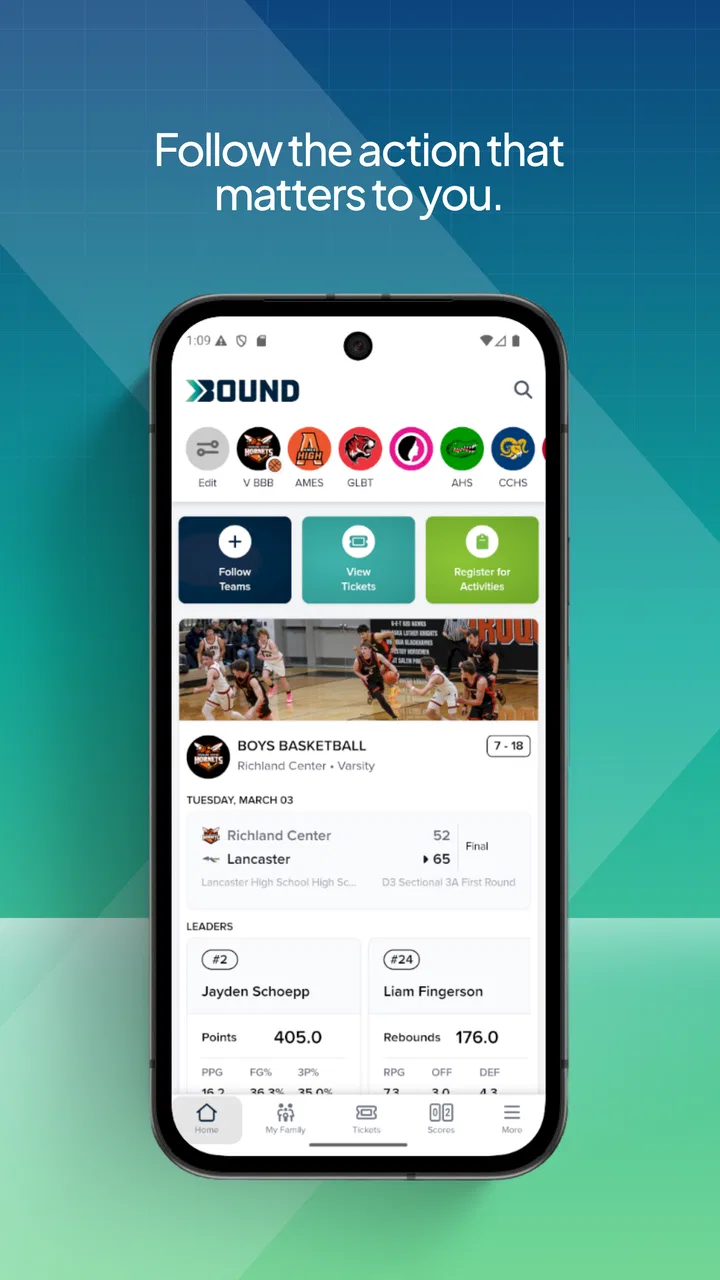
I approached Bound as a parent- and athlete-facing sports app rather than as another general fitness download. Its focus is youth sports and activities, and that changes the questions I ask before recommending it: Is it comfortable for a young athlete to use? Does it help a family stay organized? Are the choices clear when an account or personal information is involved? After spending time with it, my view is positive but careful. It is a focused option from Bound - Youth Sports & Activities, and its strongest value comes from bringing youth-sports activity into one place without asking users to pay upfront.
The app is free, carries an Everyone 10+ age rating, and has reached over one hundred thousand installs. Those details make it approachable for families who want to try it without committing money immediately. At the same time, a youth-oriented app deserves more than a quick look at its download count. I pay attention to how much control the user appears to have, whether a parent can remain involved, and whether the app feels useful beyond the first launch. That is the lens I used here.
Where Bound fits in a family’s sports routine
Bound sits in the sports category, but I would not treat it as a replacement for a dedicated training tracker, a team messaging service, or a full club-management platform. Its identity is closer to a youth-activity companion. That distinction matters because the best reason to install it is not necessarily to measure every workout. It is to make participation in youth sports easier to follow and more visible to the people involved.
You May Also Like

 Blood Strike: 2.5 Anniversary
Blood Strike’s Loadouts Turn Every Drop Into a Tactical Gamble
A close look at Blood Strike’s custom loadouts: how fast access to signature weapons reshapes its battle royale rhythm, rewards preparation, and narrows the gap between fights.

 Pandora - Music & Podcasts
Pandora’s Music Is Easy to Start, but Harder to Recover
Pandora’s strength is its low-effort path from a seed to a station. Its weak spot is how much confidence it asks you to place in connection, setup, and quiet recovery.

 8 Ball Pool
 Is Built on Rivalries, Rematches, and Routine
A close look at the rivalries, rematches, shared routines, and unanswered safety questions that turn a quick pool match into a persistent mobile community.

 Samsung Music
’s Quiet Strength Is Playing What You Already Own
Its reach comes less from spectacle than from dependable access to a personal library. That simplicity is both the app’s strongest retention engine and its ceiling.

 AccuWeather: Weather Radar
AccuWeather Review: A Quick, Clear Forecast for Everyday Decisions
For everyday plans, the best forecast is the one you can understand quickly. AccuWeather makes rain timing, radar, and local conditions easy to act on, with a few trade-offs.

 Hill Climb Racing
Why Hill Climb Racing Still Turns Crashes Into One More Run
A tiny car, a bumpy hill and one more upgrade: Hill Climb Racing keeps resurfacing because its simple chaos makes every near-miss feel personal.
More From Our News Desk
View All News


In an everyday scenario, I can see a parent using it while comparing activities for a child, checking what is relevant before a busy week, and keeping the athlete engaged between organized sessions. A young player might open it with a different goal: finding something that feels active and motivating without being buried under adult-oriented fitness language. The app makes more sense when both sides have a role, even if the parent remains the person who decides whether it is appropriate.
That family setting also explains why I would not judge it by the same standards as a running app. A running app is usually built around distance, pace, routes, and personal records. A team communication tool is built around announcements and schedules. Bound’s appeal is broader and more youth-centered, so its usefulness depends on whether it fits the family’s existing routine instead of trying to replace every other tool.
The public response is encouraging: it holds a 4.2 average from more than five hundred ratings, with over two hundred written reviews. I see that as a useful sign of interest, not a guarantee that every family will have the same experience. Sports apps can feel excellent when they match a child’s activity and frustrating when the household needs a very specific club workflow. I would use the rating as reassurance to try it, not as a reason to skip a hands-on check.
What I would check before handing it to a child
My first practical recommendation is to begin with a parent present. That is not because the app’s Everyone 10+ rating makes it unsuitable for younger users; it is because youth sports involve names, schedules, teams, and social context. A short setup session lets an adult see what the child is being asked to enter, which screens are visible, and whether the choices make sense for the family.
I would also avoid creating a rushed account during a car ride or immediately before practice. Take a few minutes to read each prompt, choose only the information needed for the experience, and make sure the child understands which parts of the profile are personal. This is a small habit, but it gives the family more control than simply accepting every setup screen.
For a household with several children, I would decide in advance whether each athlete needs a separate profile or whether one parent will manage the app centrally. That choice affects clarity. Separate identities may keep activities distinct, while a shared adult-led approach can be simpler for a younger child. I would not assume that one arrangement is automatically best; the right choice depends on age, independence, and how much the child uses the phone alone.
Trust is part of the sports experience
With a youth-focused product, trust is not a decorative extra. I want visible explanations around account controls, personal information, and any interaction that could make a child’s activity more public. I also want the user to be able to pause and reconsider rather than being pushed through a confusing sequence. The most reassuring experience is one where a parent can understand the choices without needing technical knowledge.
My advice is to treat every permission or profile question as a decision, not as a formality. If a request is clearly connected to the feature you are trying to use, the reason should be understandable. If it feels unrelated, wait and investigate inside the app’s own explanations before continuing. I am deliberately not making claims about permissions or data practices that are not visibly established here; instead, I recommend judging the current screens on your device and keeping the user in charge.
This approach is especially important because a free app can still have a meaningful privacy cost if a family shares more than it intended. “Free” describes the price of downloading Bound, not a reason to stop asking questions. I would use the app’s account and device settings as part of the review process, check what can be edited or removed, and revisit those choices after the child’s activity changes.
Controls I would look for during setup and daily use
When I test an app for a family, I look for practical control rather than vague reassurance. Can the adult tell whose profile is active? Can the user correct an accidental entry? Is it obvious when information is being shared with other people? Can an account be managed without handing the phone to a child every time? These questions are more useful than simply counting buttons or judging the color of the interface.
Bound is at its best when it helps a family make those decisions deliberately. I would keep notifications limited to what the household genuinely needs, especially on a child’s device. Too many alerts can turn an activity app into background noise, while carefully chosen reminders can help a young athlete remember to check in. If the app offers notification categories on the device, I would review them after the first week rather than leaving the defaults untouched.
I would also separate discovery from commitment. Let the child explore the activity side first, then decide whether an account, profile details, or ongoing participation are worthwhile. This staged approach reduces the chance of creating a detailed profile before the family knows whether Bound fits. It is one of the more useful habits I can recommend because it works even when an app’s interface changes over time.
Moments when personal information deserves extra attention
Youth sports naturally create sensitive moments. A profile may be connected to an age group, a team, a location, or a regular routine. Even when each individual detail seems harmless, the combination can say more than a parent expects. I would therefore avoid adding precise information unless it directly improves the activity experience, and I would review old details when a season or program ends.
Another moment is the handoff between parent and child. A child may use the same phone independently after an adult completes setup. Before that happens, I would walk through the account area together and explain which actions are okay to take alone and which should be discussed first. This is more effective than relying only on an age label, because children differ widely in judgment and technical confidence.
I would take the same care when sharing screenshots or inviting friends to try an activity. A screenshot can reveal a name, team reference, or routine even when the intention is harmless. Bound may be used socially, but I would keep sharing selective and ask the child to check with an adult before posting anything connected to their sports life.
Parents should also remember that uninstalling an app is not the same thing as reviewing an account. If a child stops using Bound, I would first look through the app’s account controls and the device settings, then remove access or profile information where the available controls allow it. That is a sensible closing step for any youth-oriented service and helps prevent forgotten accounts from lingering unnoticed.
How it compares with the usual alternatives
Compared with a general fitness app, Bound is the more natural choice when the user is a young athlete or a family exploring organized activities. General fitness products often assume that the individual user is tracking personal goals alone. Bound’s youth-sports identity makes it more relevant to the relationship between child, parent, and activity.
Compared with a club’s messaging group, however, I would not expect the same kind of operational detail. Messaging tools are usually better for last-minute changes, direct questions, and coach announcements. If your main need is knowing whether practice moved indoors, a team’s established communication channel may remain more useful. Bound should earn its place by adding activity value, not by forcing a family to abandon a tool that already handles logistics well.
It also differs from a specialized training app. A serious young athlete who wants detailed performance analysis, structured drills, or deep progress charts may prefer a product built around one sport and one measurement system. Bound is a better fit for breadth, discovery, and youth activity context than for highly technical coaching. That trade-off is important: a simpler focus can feel welcoming, but it may not satisfy advanced athletes who want granular data.
For families, the strongest setup may be complementary rather than exclusive. Use Bound for the youth-activity experience, keep the team’s normal communication method for urgent logistics, and choose a specialist tool only if the athlete truly needs detailed training feedback. I prefer this realistic arrangement to expecting one app to manage every part of a child’s sporting life.
Small habits that make the app more useful
One useful workflow is to review Bound at a fixed point in the week, perhaps before the family plans school, transport, and practice. That turns the app into part of a routine instead of another icon waiting for attention. I would ask the child what they actually want from it, then remove or ignore anything that does not support that goal.
A second tip is to use the first week as a trial period rather than judging the app after one session. Notice whether the information is understandable, whether the child returns without repeated prompting, and whether the parent can supervise without taking over. If those three things do not happen naturally, the app may not be the right fit even if its overall concept sounds appealing.
A third trade-off is independence versus oversight. Giving a child room to explore can make sports feel more personal, but a parent should still know which account is in use and how the child is interacting with the service. I would begin with shared use, then loosen supervision only when the child demonstrates that they understand the boundaries. This produces a healthier routine than either total restriction or total hands-off access.
I would also keep the app’s role proportionate. Bound should support participation, not become a scoreboard that determines whether a child is “doing well.” If the young athlete starts checking the app anxiously or comparing themselves with others, I would reduce its role and return attention to enjoyment, practice, and offline relationships. No activity app is worth making a child feel that every sports moment must be recorded.
Who should try it, and who should look elsewhere
I would recommend Bound to parents looking for a free, youth-oriented starting point, especially when a child is exploring activities or wants a sports app that does not feel designed only for adults. It is also worth trying for families who want to give a young athlete more ownership while keeping an adult involved in setup and account decisions.
I would be more cautious if your household needs formal team administration, detailed coaching analytics, or a single place for every schedule and message. In those cases, a club platform, team communication tool, or sport-specific tracker may be the better primary choice. Bound can still be useful alongside one of those services, but I would not install it expecting it to solve administrative problems it was not designed to solve.
Families who dislike creating accounts or who want a completely offline activity experience may also prefer a simpler alternative. The value here depends on engaging with the app’s choices and making it part of a routine. If the child rarely uses a phone, the benefit may be limited; a paper schedule, coach handout, or direct family conversation could be more effective.
Version, support expectations, and my cautious verdict
The current version is 2.1.4, and the app requires iOS 11 or later. That makes the technical entry point relatively accessible for users with compatible devices, although I would still install it on the actual phone the child will use and check that the experience remains comfortable on its screen. A family app should be easy to open, read, and manage without turning setup into a technical project.
My final assessment is that Bound earns a place on a shortlist, not an automatic place on every family phone. Its free price and youth-sports focus make it easy to test, while its established audience and 4.2 average suggest that many users find value in the concept. I like it most as a guided family tool: an adult sets sensible boundaries, the child gets room to participate, and both sides periodically review whether the app is still helping.
The key trust test is simple: install it with the child, examine every account and sharing choice together, and keep only what genuinely supports the activity. If Bound makes youth sports feel more organized and engaging without taking control away from the family, it is a worthwhile addition. If your priority is professional-grade training data, club administration, or minimal digital involvement, choose a more specialized or more traditional alternative instead.
That balance is why I would recommend trying Bound carefully rather than praising it without conditions. It has a clear audience, a sensible free starting point, and enough flexibility to be useful in ordinary family routines. Its success ultimately depends less on downloading it and more on how thoughtfully the household decides to use it.
FAQs for Bound
01What is Bound and what does it offer to users?
Bound is an innovative app designed to deliver immersive audio storytelling experiences. It offers a rich library of serialized audio content, including original podcasts, audiobooks, and exclusive series. Users can enjoy high-quality narratives accompanied by sound effects and music to enhance their listening experience.
02Is Bound available on both Android and iOS platforms?
Yes, Bound is available for download on both Android and iOS platforms. Users can find it in the Google Play Store and the Apple App Store, ensuring compatibility with most mobile devices. This allows users to enjoy their favorite audio content on their preferred operating system.
03Does Bound require a subscription, or is it free to use?
Bound offers both free and premium content. While some audio stories and episodes are available for free, access to exclusive content and ad-free listening may require a subscription. Users should check the app for specific pricing details and subscription options to enhance their experience.
04How does Bound enhance the audio storytelling experience?
Bound enhances storytelling by combining professional narration with high-quality sound effects and music, creating a cinematic audio experience. This immersive approach allows listeners to be transported into the story's world, making it ideal for those who enjoy rich and engaging narratives.
05Can I download audio content on Bound for offline listening?
Yes, Bound allows users to download audio content for offline listening. This feature is particularly useful for users who want to enjoy their favorite stories without needing an internet connection, whether they're commuting, traveling, or simply prefer offline access.
Pros
- User-friendly interface
- easy to navigate.
- Rich library of stories and genres.
- Offline access for reading on the go.
- Customizable reading settings.
- Regular updates with new content.
Cons
- Limited free content available.
- Requires internet for some features.
- Occasional app crashes reported.
- Subscription can be pricey for some.
- No integration with other reading apps.

Bound
Gallery